Se afișează postările cu eticheta Computer. Afișați toate postările

marți, 13 octombrie 2015

Why is it called El Capitan? Apple's operating system and the reason behind the name

Why is it called El Capitan: Apple's operating system and the reason behind the name
Apple CEO Tim Cook prepares to announce OS X El Capitan at WWDC 15
APPLE will tonight roll-out its new operating system, OS X El Capitan
 
The name of Apple's new Mac operating system says a lot about what to expect.
OS X El Capitan is named after a natural monument in California, the naming convention Apple adopted after it dropped the names of big cats in 2012 with Mountain Lion.
In real life, El Capitan is a 3000ft rock formation on the north side of Yosemite National Park
 
El Capitan then won't offer any dramatic changes, but rather refinements and enhancements to the current Mac system, OS X 10.10 Yosemite.
Its a subliminal hint Apple has used in the past.
For example, Snow Leopard tweaked and refined the radical changes Apple introduced with the previous version, OS X 10.5 Leopard.
Three years later, Mountain Lion did the same for OS X 10.7 Lion.
 
Why is it called El Capitan: Apple's operating system and the reason behind the name
Split Screen allows you to share and view content between two Full Screen applications
 
Why is it called El Capitan: Apple's operating system and the reason behind the name
OS X El Capitan adds a number of new features of Full Screen apps, like Mail
 
OS X El Capitan does bring some new functionality, including a smart Spotlight Search which now supports natural language, and a Split Screen view for the full-screen apps introduced with Lion. 
A new font – dubbed San Francisco – designed in-house at Apple will also be introduced to the Mac for the first time, after rolling out across watchOS and iOS earlier this year.

Though you're not getting a lot of new functionality, El Capitan is packed with goodies that will shave off seconds here and there. And those seconds quickly add up.

OS X El Capitan: Top 6 of the Best Tips and Hidden Tricks

OS X El Capitan: 6 of the Best Tips and Hidden Tricks
Apple has made a number of improvements to full-screen apps, and added a Split Screen view
APPLE'S latest desktop operating system – OS X 10.11 El Capitan – rolls out across the globe today. Here's what you can expect when you update your Mac operating system.
Apple will roll out its latest desktop operating system later tonight, around 6pm.
OS X El Capitan does not offer dramatic changes, but rather simple refinements and enhancements to the current Mac operating system, called Yosemite.
The new update brings a visual refinement, which hones and tweaks the new look introduced alongside Yosemite.
A new font – dubbed San Francisco – designed in-house at Apple will also be introduced to the Mac for the first time, after rolling out across watchOS and iOS earlier this year.
Though you're not getting a lot of new functionality, El Capitan is packed with goodies that will shave off seconds here and there. Those seconds will add up.
Plus – the update is free, so there is not a lot of excuses not to update.
Just back up your system using Apple's Time Machine, or another back-up solution, before heading to the Mac App Store and launching the update.
It might also be worth double-checking to ensure the software and apps you rely on to get your work done will work seamlessly with the new OS.

OS X El Capitan: 6 of the Best Tips and Hidden Tricks
The Cupertino firm claims the new update brings a number of improvements to Mac performance
Sometimes, it can take third-party app developers a matter of weeks or months to catch-up.
Once you get El Capitan, here are six features worth checking out:

Pinned Websites

A pin is like a bookmark on Apple's Safari browser, except the website you're pinning is always open and refreshing in the background. 
If you visit another website and come back, pins remember where you left off – so long as you don't shutdown the browser.
You might say this sounds like browser tabs. 
A key difference is when you click on an external link and leave a pinned site, the browser opens a new tab, so you don't lose your place on the pinned site.
OS X El Capitan: 6 of the Best Tips and Hidden Tricks
Apps can now run side-by-side, thanks to the Split Screen views, which makes Full Screen more useful
With tabs, the new site will often replaces the site you were on.
Pinned websites means you can always guarantee your place on any chosen site.

Muting Audio

As more and more websites get aggressive at delivering video ads and content, audio might play automatically. 
This gets annoying if you're watching video in another window. 
Safari now has a speaker icon to instantly mute all audio playing in the browser, without affecting audio elsewhere. With the computer's mute button, it's all or nothing.
If the video you're watching is playing in the same browser, the audio for that will mute, too. It works better when playing video in a stand-alone app, such as iTunes. 
Or you can install a separate browser, such as Google's Chrome, and play your Netflix or Hulu video there.

Split Screens And Spaces

The Mac has long let you run multiple apps in separate windows, but you've been limited to one app when it's in full-screen mode.
This changes with El Capitan's Split View, a feature Microsoft has had since Window 8's release in 2012. 
Although you can come close to split screens by resizing two windows and placing them side by side, you now just need to press and hold the green button on the top left of an app's window.
The introduction of split screens also uncovers a little-known feature called Spaces. 
OS X El Capitan: 6 of the Best Tips and Hidden Tricks
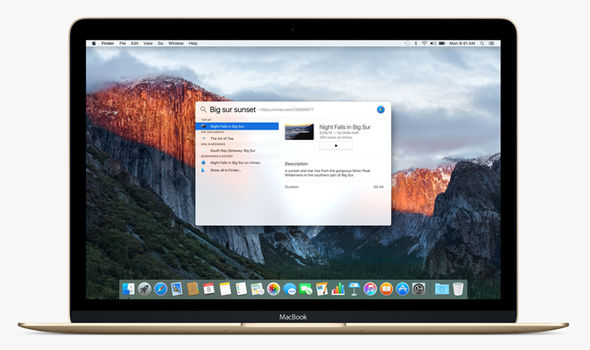
Spotlight now supports natural language in its search, such as "spreadsheets from last year"

OS X El Capitan: 6 of the Best Tips and Hidden Tricks
The new update could cause havoc for third-party spotlight replacements, like Alfred and QuickSilver
If your desktop feels cluttered, you can spread your apps out in groups, or Spaces. One Space might be for your productivity apps, such as spreadsheets.
Another might be for goofing off. If you're on a laptop, it's easy to switch by swiping three fingers on the touchpad left or right. 
That's perfect for when your boss suddenly walks by.

Better Notes

The Notes app has traditionally been little more than a word-processing app. 
Now, it's possible to drag in photos, add map locations and create checklists. It's also easier to sift through Web links and attachments you've added. 
The Notes app on iPhones and iPads got a comparable update, and your notes sync across Apple devices. 
You can also access them on Windows computers through iCloud.com. Android users are out of luck.
OS X El Capitan: 6 of the Best Tips and Hidden Tricks
iCloud Notes have been improved and now include images and handwritten notes

Smarter Search

You can search for old documents using natural language, such as "find me spreadsheets from March 2013".
The search tool also retrieves more types of information, including weather and stock quotes.

OS X El Capitan: 6 of the Best Tips and Hidden Tricks

Shaky Cursor

No doubt you've had times you've needed to select text or move a window, but you have no idea where the cursor went. 
Now, just move the mouse back and forth rapidly, or swipe your finger back and forth on the touchpad if it's a laptop. 
The cursor turns into a giant arrow for better visibility.
It might remind you of those giant foam fingers at parades and sports arenas. Freaky, but useful.

duminică, 11 august 2013

TOP 6 Softuri gratuite de editare audio

Sunt situații în care ai nevoie de un program de editare audio. Poate nu-ți place calitatea unei piese, ai vrea să scoți zgomotul de fundal dintr-o înregistrare sau pur și simplu vrei să combini, ca să te distrezi, mai multe piese și înregistrări. Pentru astfel de operațiuni nu ai avea nevoie de softuri foarte complexe.

Vă prezentăm câteva programe de editare audio gratuite pe care le puteți folosi. Câteva dintre acestea pot concura lejer cu multe softuri care îți cer bani pe licență. 

Audacity. Este unul dintre cele mai populare softuri open-source de editare audio. Funcționează pe toate sistemele de operare.Te ajută să faci înregistrări live, poți importa și edita fișiere mp3, wav, aiff, sau ogg. Are o sumedenie de efecte și poate, de exemplu, să elimine zgomotul de fond. 

Tunekitten Audio Editor. Este un soft simplu de editare audio, care are câteva efecte de bază. Poți modifica intensitatea bass-ului sau a înaltelor de exemplu. Suportă mai multe formate: avi, mp3, ogg și wav. De asemenea și aceast soft vă ajută să faceți înregistrări live performante.

MP3 Cutter. Este perfect pentru cei care nu vor decât să taie melodiile preferate sau au nevoie de bucăți din fișierele audio de tip mp3, wav sau ogg. E foarte simplu de folosit și, la fel ca și celelalte, e gratuit.

MP3Gain. Acest soft are câteva aplicații de bază și nu este unul foarte complex, fiind indicat celor care nu vor să facă editare audio avansată. Poți regla volumul melodiilor sau înregistrărilor. Marele avantaj este că nu se pierde din calitatea fișierelor mp3 după editare.

Audio Joiner. E o aplicație pentru cei care vor să combine mai multe piese sau înregistrări într-un singur fișier. Nu există o limită a numărului de piese pe care vrei să le combini și suportă fișiere mp3, m4a și wav. Funcționează online, astfel încât nu ai nevoie să downloadezi și să instalezi nimic pe computer.

WaveShop. E un program de editare audio care funcționează doar pe sistemele cu Windows. Se laudă că, după editare, calitatea piesei rămâne la fel de bună. Suportă și poate converti majoritatea fișierelor audio.

vineri, 5 iulie 2013

TOP 5. Aplicații muzicale pentru smartphone

Smartphone-urile au făcut uitate playerele muzicale. Din această cauză, producătorii de telefoane sunt foarte atenți la partea de sunet și la calitatea căștilor. Și pentru că nu există zi în care să nu ascultăm cel puțin câteva minute muzică la telefon, iată câteva aplicații esențiale care vă vor ajuta în acestă privință:  

Shazam. Dacă auzi o melodie care îți place și nu știi cine o cântă sau cum se cheamă, această aplicație te ajută să o identifici în câteva secunde. Îți va spune melodia și artistul, unde o mai poți asculta sau de unde o poți cumpăra online.

Soundhound. Funcționează cam după aceleași principii ca Shazam. Și această aplicație recunoaște melodiile. Piesele le poți împărtăși cu prietenii prin rețelele de socializare. Acest gen de aplicație este capabil să recunoască chiar și filme după sunet. Deocamdată este vorba doar despre cele celebre, care se găsesc la vânzare pe internet prin intermediul marilor rețele de distribuție.   

TuneIn Radio. Poți asculta online posturi de radio din întreaga lume, inclusiv pe cele din România. De asemenea, se pot asculta online și concerte și diverse show-uri, în special cele de peste Ocean. Dacă vreți varianta Pro, costă în jur de 17 lei la magazinele online de aplicații.

SoundCloud. Este una dintre cele mai mari rețele a muzicienilor profesioniști și amatori și a celor care vor să asculte muzică online. Piesele sunt împărțite pe genuri muzicale. Le poți comenta și îți poți crea un playlist cu piesele preferate și le poți împărtăși cu prietenii.

Uberhype. Este o versiune mobilă a platformei The Hype Machine. Prin această aplicație aflați care sunt cele mai populare piese pe internet. Cu cât o piesă apare mai des pe blogurile de specialitate, cu atât aceasta va urca și mai mult în topul The Hype Machine.

luni, 22 aprilie 2013

TOP 10 Most Adorable Easter Bunny Wallpapers

Easter Bunny Egg Wallpaper
Easter Egg Hunt Wallpaper
Easter Bunny Basket Wallpaper
Cute bunny in flowers Wallpaper

Red Eyed Bunny Wallpaper
Small Bunny in Grass Wallpaper
Bunny Dressed Like Penguin Wallpaper
Hard Boiled Egg - Chick or Bunny?
Easter Candy
Gray Haired Bunny Wallpaper